
What is RSS?
Although there is some debate, most people agree that RSS stands for Really Simple Syndication.
It can be used by news websites, weblogs and podcasting to deliver information (e.g. news, articles, audio and video) directly to an internet user.
Please note: the RSS channel in myUWE is primarily a news channel and is not designed for audio and video.
RSS allows you to see when sites from all over the internet have added new content. You can get the latest headlines and articles in one place, as soon as they are published, without having to remember to visit each site every day. It can take the hassle out of staying up-to-date, by showing you the very latest information that you are interested in.
These feeds can the be delivered automatically to specialist software on your computer or to web-based feed readers and news aggregators (such as myUWE's news channel). In many cases this can reduce the need for clicking from site to site (e.g. in search of breaking international news headlines).
Websites with RSS news feeds often display one or all of the following icons: 


To receive different RSS information the user needs to 'subscribe' or 'unsubscribe' to the various different RSS 'feeds'.
The online information resource Wikipedia has more information regarding RSS.
The RSS News Feeds channel in myUWE
The RSS News Feeds channel in myUWE has been developed primarily as a news channel and has not been designed for audio or video.
The RSS News Feeds channel is located in the middle right of the myUWE Home screen.
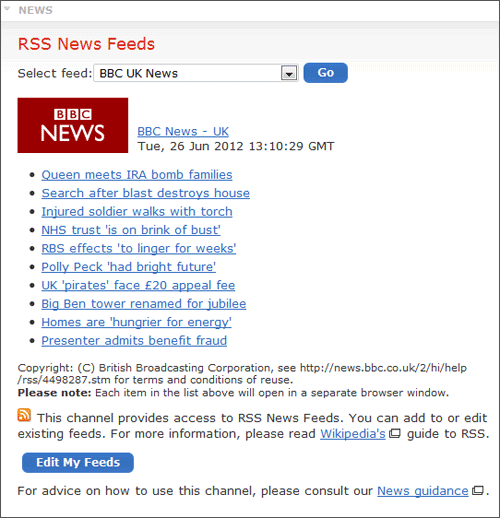
Users are able to select the feed that they wish to view from a drop down list and then pressing 'Go'.
myUWE has put together a list of feeds which maybe of interest to myUWE users (these include news organisations like the BBC, online newspapers such as The Guardian and other organisations such as The Watershed). You are able to edit and add your own feeds as well.
The illustrated example below shows the feed supplied by the BBC UK News website. It lists a series of news headlines and articles. Each item in the list is effectively a web 'link'. Clicking the link will open up a new browser window with the relevant BBC UK News website page/article in full.
Editing your feeds
Clicking 'Edit My Feeds' allows you to add and edit the RSS feeds for the myUWE News channel. The illustration below is an example of what you might see:
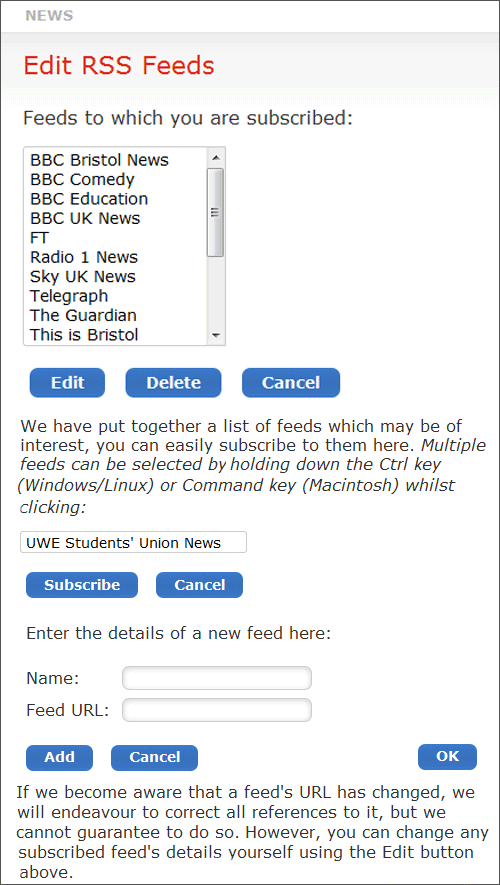
There are three sections where you can edit your RSS feeds:
Feeds to which you are subscribed
The list here shows all the RSS feeds you are currently 'subscribed' to (and therefore have access to in the myUWE RSSnews channel). You can select an individual feed and edit or delete it.
If you edit a feed you will be able to change the URL of the feed (in 'Feed URL' text box) and/or the feed name (in the 'Name' text box).
Feeds you may be interested in
myUWE has put together a number of feeds that you may be interested in. Selecting the feed you want and then clicking 'Subscribe' will allow you to access it in the myUWE News channel every time you use myUWE.
Details of a new feed
You are able to enter the URL of a new feed (in the 'Feed URL' text box) and then assign it any name that you want (in the 'Name' text box).
The URL is usually available from the website that is supplying the feed. So, for example, the URL for the BBC's UK news RSS feed can be found at their news website and takes the form: http://newsrss.bbc.co.uk/rss/newsonline_uk_edition/uk/rss.xml.
When a new feed has been added you are automatically 'subscribed' to it and will have access to it every time you use myUWE.